What software do I need for my SDR?
Theoretical Concepts and Practical Foundations
Typical Customer Design Flow
Software-defined radio development follows a progressive, stage-based approach that takes designs from initial research through to production deployment. The key advantage of ADI’s approach is that the same HDL, software, and infrastructure components are used throughout the entire flow, reducing the learning curve and development risk at each stage.

The typical customer design flow consists of 5 progressive stages, each building upon the previous one.
In the research phase, engineers validate that the chosen ADI device meets application requirements through simulation and measurement.
Key activities include:
Behavioral Simulation: Model the system before building hardware
Device Evaluation: Test actual hardware performance using evaluation boards
Measurements: Characterize critical performance metrics such as SFDR (Spurious-Free Dynamic Range), SNR (Signal-to-Noise Ratio), EVM (Error Vector Magnitude), NF (Noise Figure), and NSD (Noise Spectral Density)
Tools used: Evaluation boards, IIO Oscilloscope, ACE software, bench test equipment.
During the Algorithm Development phase, engineers implement signal processing algorithms using high-level languages while streaming real data from hardware. Here, the focus is on rapid prototyping and validation of algorithms in realistic conditions via MATLAB/Python/GRC Reference Implementation, Hardware Streaming, and Iterative Development.
Development environments at this stage include MATLAB, Simulink with ADI toolboxes, Python with PyADI-IIO, GNU Radio Companion with gr-iio blocks.
The Design Elaboration phase refines algorithms for embedded deployment through modeling and optimization. This stage include modeling using the same development tools, validating optimized algorithms with real hardware data, and transitioning from floating-point to fixed-point arithmetic for efficient hardware implementation.
Critical considerations include fixed-point precision, filter coefficient quantization, timing budgets, and FPGA resource utilization.
While prototyping, algorithms are deployed to development hardware for integration and optimization. This stage includes:
Deployment to Development Board: Move algorithms to actual hardware (PlutoSDR, Jupiter, or FMC boards)
Design Optimization: Tune for performance and resource efficiency
HDL Integration: Integrate custom signal processing with ADI reference designs
The final stage, Production, includes deployment to custom hardware with complete system validation.
Throughout all stages, the same HDL IP cores, Linux kernel drivers, and application software are reused, dramatically reducing development risk and time-to-market.
Software in the Design-in Journey
ADI’s software ecosystem provides a cohesive solution across the entire design-in journey, supporting multiple development environments while maintaining a common underlying infrastructure. The ecosystem enables engineers to work in their preferred tools—whether GUI-based applications, scripting environments, or modeling platforms—all leveraging the same drivers, libraries, and hardware abstraction layers.
Common Software Infrastructure:
All components below are part of the DataX ecosystem.
libiio: Cross-platform library providing unified hardware access
IIO Kernel Drivers: Linux drivers for ADI converters and transceivers
iiod Server: Network-transparent access to hardware
Language Bindings: Support for C, C++, Python, MATLAB, and more
Development Tools and Environments:
IIO Oscilloscope (link): Cross-platform GUI for visualizing and controlling IIO devices
MATLAB and Simulink: ADI toolboxes for algorithm development and modeling
Python, Jupiter, and PyADI-IIO: Python library for rapid prototyping with ADI hardware
GNU Radio with gr-iio (link) blocks for flowgraph-based development
ACE Software (link): Plugin-based framework for evaluation board control
Scopy (link): Modern multi-instrument software suite
Evaluation, Test and Analysis
Analog Devices provides a single cohesive software solution, meeting customers in their ecosystem or at their tools of choice.
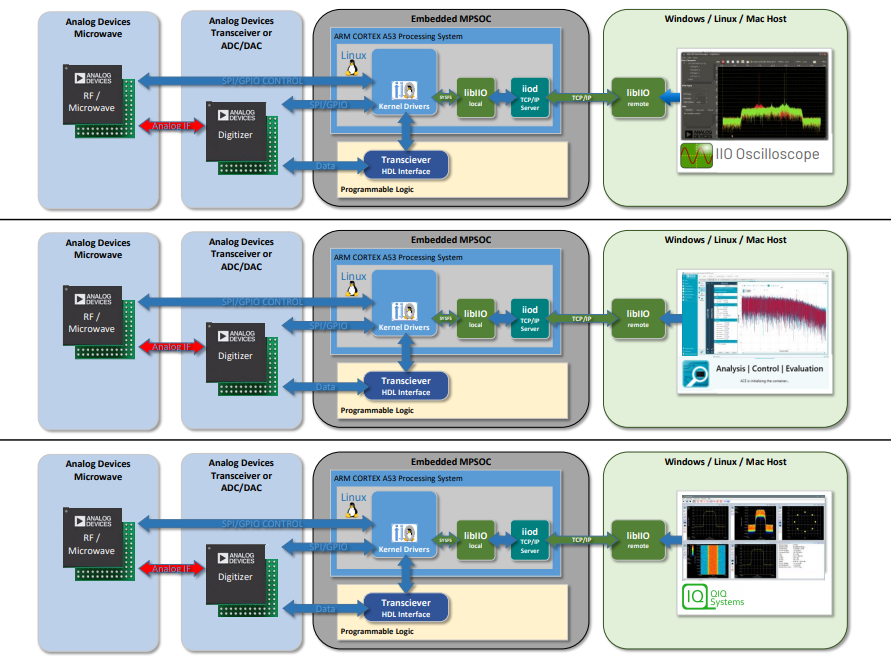
Product Evaluation uses hardware and software tools to verify that the transceiver meets application requirements.
Time investment is (very roughly) proportional to complexity and how application specific it needs to be.
Tools: IIO Oscilloscope, ACE software, Scopy, GNU Radio, MATLAB, bench test equipment
Algorithmic Development, Modeling and Prototyping
Product Prototyping provides Plug ‘n’ Play hardware and software to see the key features and performance of the part.
It can configure, capture signals, or generate waveforms in 10-15 minutes, stream real data from hardware into development environments (MATLAB, Python, GNU Radio) and develop and validate algorithms with hardware-in-the-loop
Development Environments: MATLAB, Simulink, Python, PyADI-IIO, GNU Radio Companion
Tools: MATLAB, Simulink, Python, PyADI-IIO, GNU Radio
Building Blocks for Development and New Revenue Streams
ADI’s modular architecture provides reusable building blocks that accelerate development and create opportunities for new applications and revenue streams.
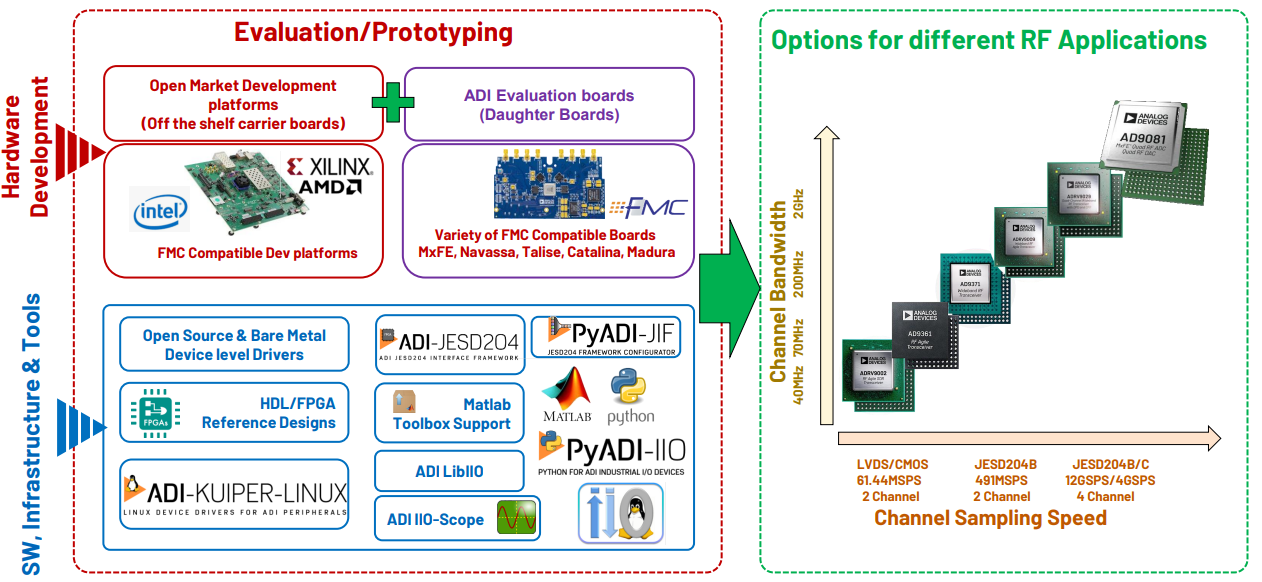
Modular building blocks enable rapid development and platform scalability. Signal processing components including filters, decimators, interpolators, and other DSP primitives are standard offerings that accelerate algorithm implementation. Protocol implementations such as OFDM, QPSK, and FSK are pre-implemented for rapid deployment, while pre-validated HDL provides high-performance streaming and buffering for demanding applications.
Efficient clock and power distribution features enable portable and battery-powered applications. Multiple libraries and frameworks provide flexible hardware access and algorithm development: PyADI-IIO for rapid Python prototyping with hardware-in-the-loop, MATLAB and Simulink toolboxes for system-level modeling and deployment, GNU Radio with gr-iio blocks for flowgraph-based signal processing, and standardized Linux drivers that reduce integration effort.
The business benefits are compelling. Faster time-to-market results from pre-validated components that reduce development cycles, while proven building blocks minimize integration challenges and eliminate redundant design work through IP reuse. Platform scalability allows you to start with ADALM-PLUTO and scale seamlessly to production platforms.
Revenue opportunities emerge through application-specific solutions for vertical markets, proprietary algorithm development, custom hardware transitions with unified software stacks, and IP licensing of optimized implementations.
Common Architecture for Easy Platform Transition
The common architecture across ADI’s platforms makes it easy to transition between hardware as your project evolves from prototype to production.
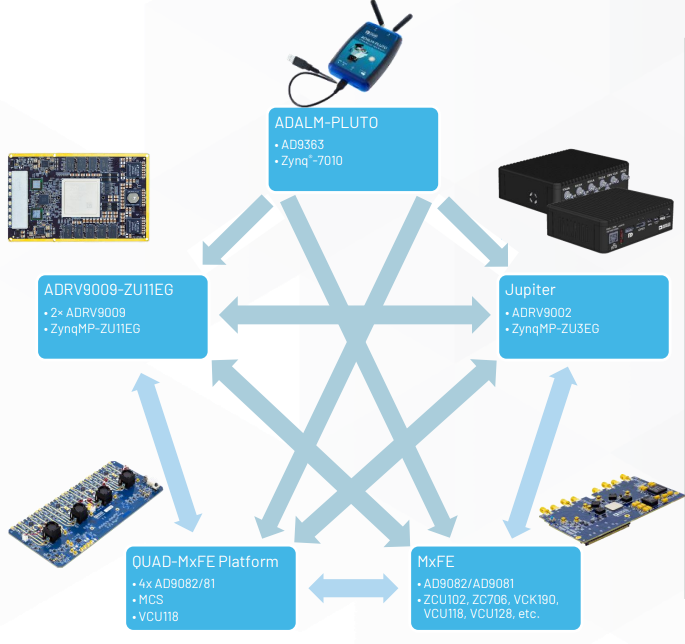
Shared Software and HDL Stack:
Same libraries: libiio, PyADI-IIO, and hardware drivers work across all platforms
Common Linux image: ADI Kuiper Linux brings up the same software stack whether on a laptop or embedded board
Unified HDL: Common FPGA designs across all SDR platforms
Consistent drivers: Same drivers whether accessing hardware locally or via USB
Platform Progression:
- Start with ADALM-PLUTO:
Provides quick verification, rapid algorithm development, and SIGINT applications at very low cost
- Scale to production:
Same software and HDL seamlessly transfer to higher-performance platforms
- Use modules for clean design:
Leverage ADI’s reference designs and IP cores
Open Source Repositories:
Common Linux kernel and drivers: https://github.com/analogdevicesinc/linux
Common HDL IP cores: https://github.com/analogdevicesinc/hdl
This architecture ensures that code developed on entry-level hardware like ADALM-PLUTO can be reused on production platforms with minimal changes, dramatically reducing development risk and time-to-market.
Analysis | Control | Evaluation
Once you have the IIO framework set up, you need tools to analyze, control, and evaluate your hardware. ADI provides several software tools that work seamlessly with IIO devices, from simple command-line utilities to full-featured graphical applications.
ACE Software and Plugins
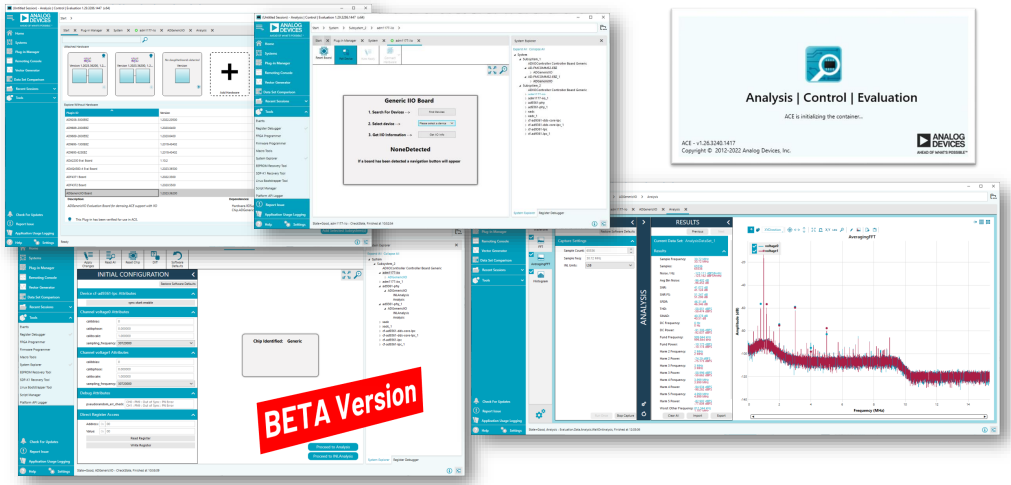
ACE (Analysis, Control, Evaluation) is ADI’s original software framework for interacting with evaluation boards and development platforms. It provides a plugin-based architecture where different modules can control specific hardware features.
ADGenericIIOBoard Plugin is a key plugin within ACE that enables interaction with any IIO-compatible device. This generic approach means you can use the same plugin to control different ADI evaluation boards without requiring board-specific software.
Installation:
Download ACE from the ADI website. ACE is available for Windows only.
IIO Oscilloscope
IIO Oscilloscope (IIO-Scope) is a powerful cross-platform application for visualizing and controlling IIO devices. It provides both time-domain and frequency-domain visualization along with device configuration capabilities.
Key Features:
Multi-platform support: Runs on Linux, Windows, and macOS
Time and frequency domain plots: View signals in both domains simultaneously
Device configuration: Modify hardware parameters in real-time
Plugin architecture: Extensible with generic and device-specific plugins
Remote operation: Can connect to IIO devices over network using iiod
Installation:
# Debian/Ubuntu
sudo apt install iio-oscilloscope
Download the installer from the IIO Oscilloscope releases.
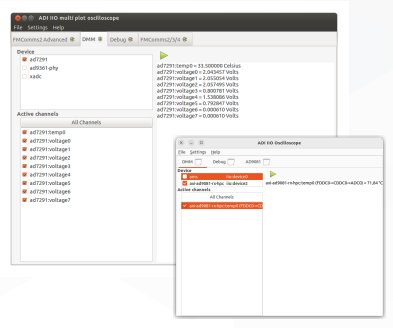
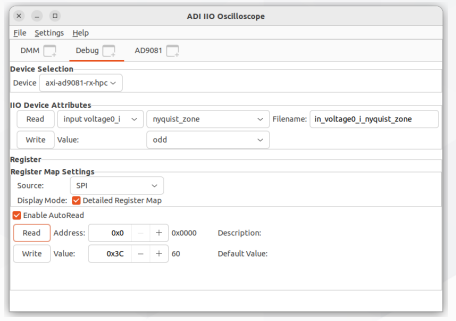
Generic Plugins:
IIO-Scope includes several generic plugins that work with any IIO device:
Specific Control Plugins:
For more complex devices, IIO-Scope offers specialized plugins:
- FPGA Settings Plugin:
Controls FPGA-specific parameters such as clock configurations, data path settings, and interface modes
- High Level Device Control Plugins:
Provide intuitive interfaces for complex RF transceivers, DACs, and ADCs with features like frequency tuning, gain control, and filter configuration
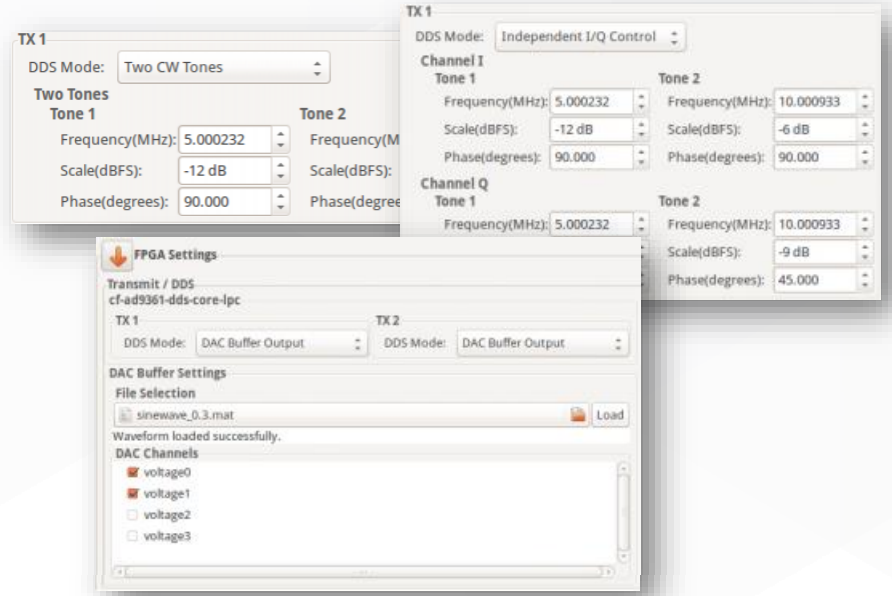
Figure 8 FPGA Settings Plugin for controlling FPGA-specific parameters
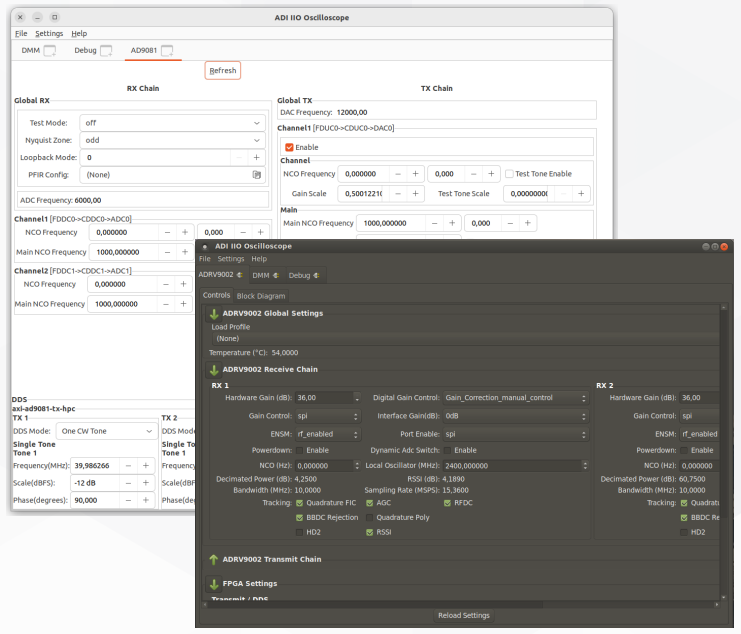
Figure 9 High Level Device Control Plugin providing intuitive interfaces for RF transceivers
IIO Command Line Tools
For automation, scripting, and headless operation, the IIO framework includes command-line utilities:
iio_info: Lists all available IIO devices and their attributes
iio_attr: Reads or writes device/channel attributes
iio_readdev: Captures samples from device channels
iio_writedev: Transmits samples to device channels
iio_reg: Direct register access for low-level debugging
These tools are particularly useful for:
Automated testing and continuous integration
Remote device control via SSH
Scripting complex measurement sequences
Quick parameter verification without GUI overhead
Installation:
# Debian/Ubuntu
sudo apt install libiio-utils
Download libiio from the libiio releases. The command-line tools are included in the installer.
iio_info
Displays information about all available IIO devices and their attributes, channels, and triggering capabilities.
iio_info
iio_info -n 192.168.1.100
iio_attr
Reads or writes device and channel attributes for configuration and control.
iio_attr -d cf-ad9361-lpc
iio_attr -c voltage0 frequency
iio_attr -c voltage0 frequency 2400000000
iio_readdev
Captures samples from device channels and saves to file for analysis.
iio_readdev -d cf-ad9361-lpc -c voltage0 -s 1024 > samples.raw
iio_writedev
Transmits samples from file to device channels.
iio_writedev -d cf-ad9361-lpc -c voltage0 < samples.raw
Remote Access via iiod
Connect to IIO devices over network using the iiod server:
iio_info -n 10.48.65.212
Scopy: Next-Generation Analysis Tool
Scopy is ADI’s modern, next-generation instrument software that supersedes IIO-Scope with enhanced capabilities and a more intuitive interface. It transforms your PC into a complete laboratory instrument suite.
Scopy provides:
Multiple instrument views: Oscilloscope, spectrum analyzer, network analyzer, signal generator, logic analyzer, pattern generator, and more
Modern UI/UX: Contemporary interface with improved usability
Enhanced visualization: Advanced plotting with zoom, cursors, measurements, and annotations
Cross-platform: Available for Windows, Linux, and macOS
Generic IIO support: Works with any IIO-compatible device, not just ADI hardware
Export capabilities: Save data, screenshots, and configurations for documentation
Installation:
Download Scopy from the Scopy releases page. Installers are available for Windows, Linux (AppImage, Flatpak), and macOS.
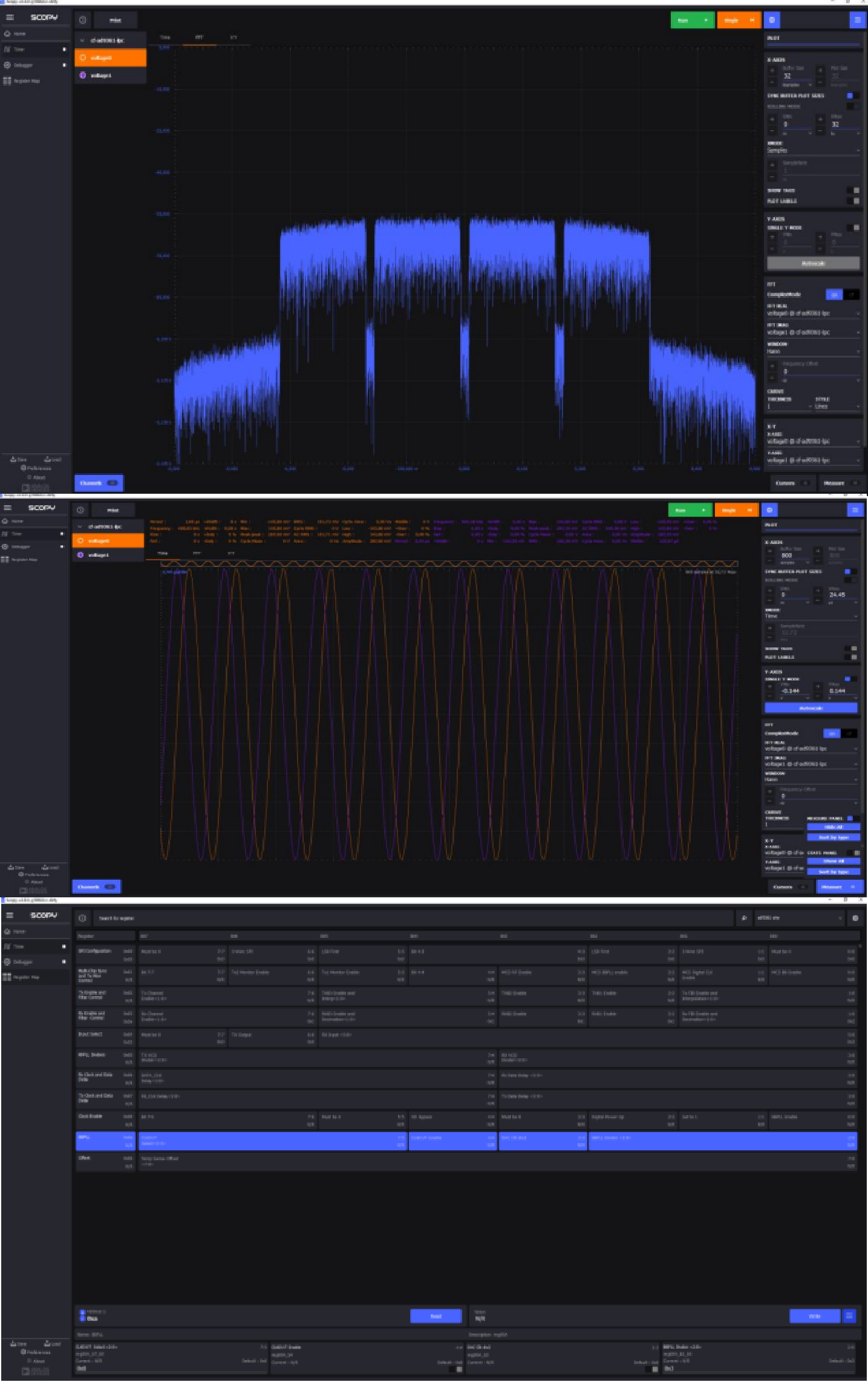
Scopy is the recommended tool for new projects, offering a more complete and modern experience than the older IIO-Scope application.
qIQ Receiver
qIQ Receiver is a specialized application for analyzing and demodulating various wireless communication standards. It’s particularly useful for RF engineers working with:
Digital modulation analysis: BPSK, QPSK, QAM, and other modulation schemes
Constellation diagrams: Real-time visualization of modulation quality
Spectrum analysis: Detailed frequency domain analysis
Recording and playback: Capture RF signals for offline analysis
Installation:
qIQ Receiver is available for Windows. Download from the qIQ Receiver page.
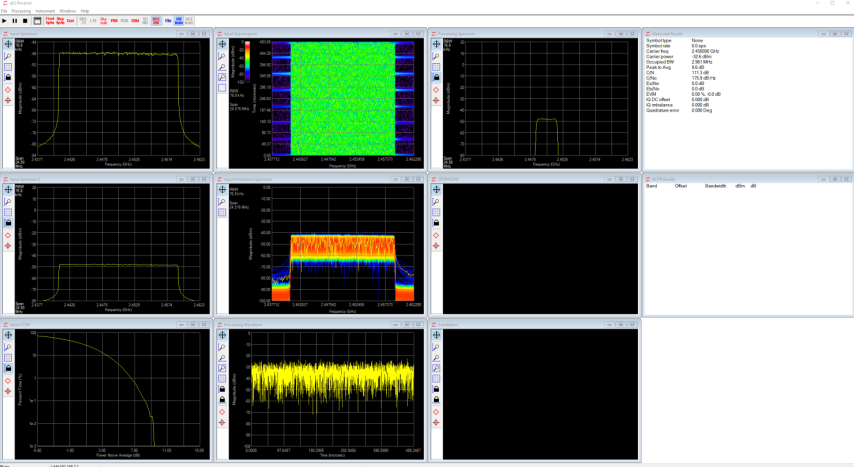
qIQ Receiver bridges the gap between generic oscilloscope tools and specialized protocol analyzers, making it easier to develop and debug wireless communication systems with ADI SDR platforms.
GNU Radio
GNU Radio is a free and open-source software development toolkit that provides signal processing blocks to implement software-defined radios and signal processing systems. ADI provides the gr-iio block set for seamless integration with IIO-compatible hardware.
Key Features:
Visual flowgraph design: GNU Radio Companion (GRC) provides a graphical interface for building signal processing chains by connecting blocks
Extensive block library: Hundreds of pre-built blocks for filtering, modulation, demodulation, synchronization, and more
Real-time processing: Stream data directly from SDR hardware for live signal processing
Cross-platform: Available on Linux, Windows (via Radioconda), and macOS
Python integration: Flowgraphs generate Python code, enabling scripting and automation
ADI Integration (gr-iio):
The gr-iio package provides GNU Radio blocks for:
PlutoSDR Source/Sink: Receive and transmit with ADALM-PLUTO
FMCOMMS Source/Sink: Support for FMComms and other AD936x-based platforms
Generic IIO blocks: Work with any IIO-compatible device
Installation:
# Debian/Ubuntu - install Python, pip, and GNU Radio
sudo apt install python3 python3-pip gnuradio gr-iio
Install Python (ensure “Add to PATH” is checked)
Use Radioconda to install GNU Radio:
conda install gnuradio gnuradio-iio
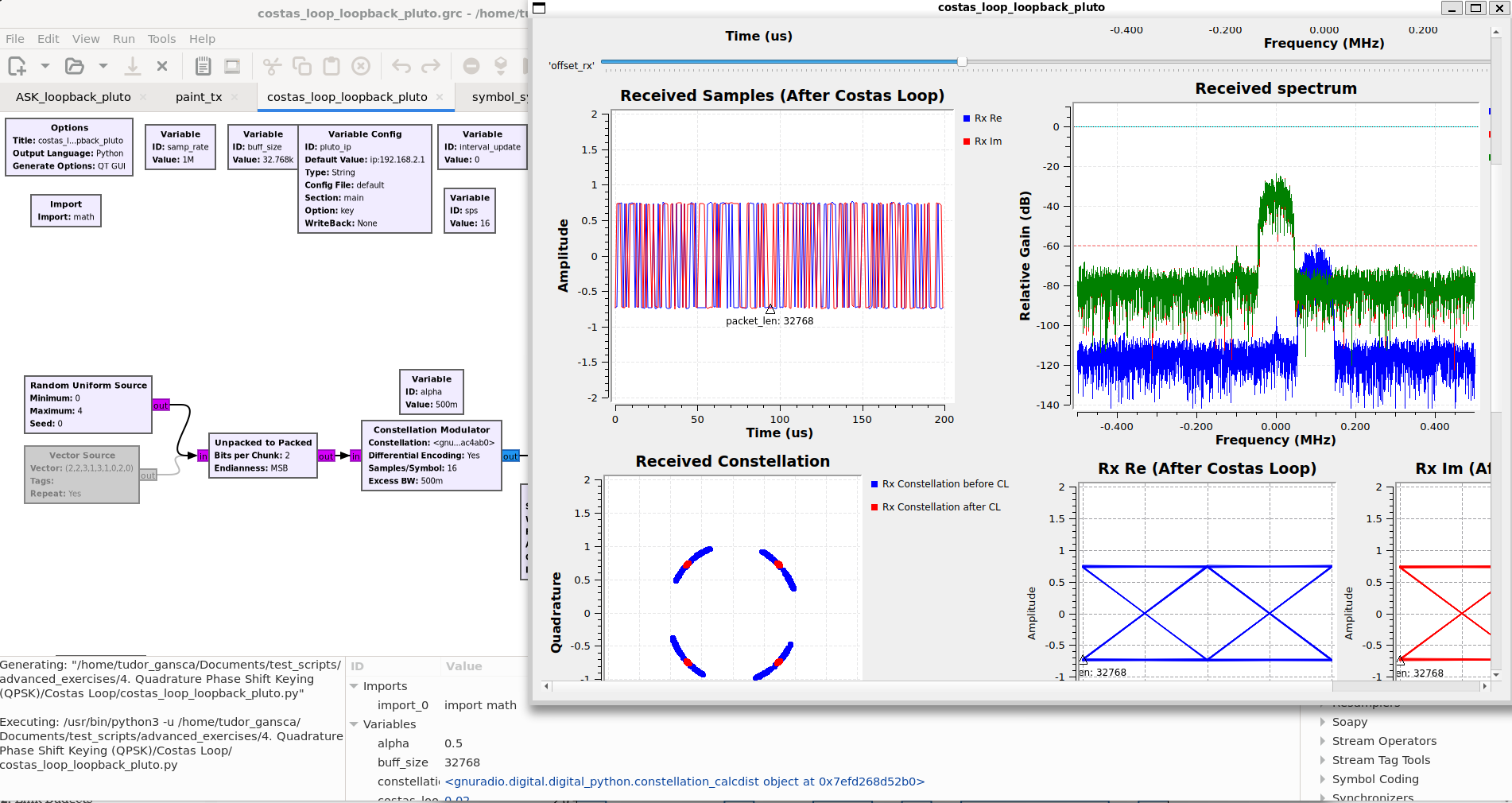
Figure 12 GNU Radio Companion flowgraph with PlutoSDR source and sink blocks
GNU Radio is ideal for rapid prototyping of communication systems, educational demonstrations, and developing custom signal processing applications with ADI SDR hardware.
MATLAB and Simulink Toolboxes
ADI provides official toolboxes for MATLAB and Simulink that enable hardware-in-the-loop development with ADI SDR platforms. These toolboxes integrate seamlessly with MathWorks’ signal processing and communications workflows.
Available Toolboxes:
Analog Devices Transceiver Toolbox: MATLAB/Simulink interface for ADI RF transceivers (AD936x, ADRV9009, etc.)
Analog Devices High Speed Converter Toolbox: Support for high-speed ADCs and DACs
Key Features:
System objects: MATLAB System objects for streaming data to/from hardware
Simulink blocks: Drag-and-drop blocks for hardware integration in Simulink models
Hardware-in-the-loop: Develop and validate algorithms with real RF signals
Code generation: Generate deployable code from Simulink models
Example library: Pre-built examples for common SDR applications
Supported Hardware:
ADALM-PLUTO (PlutoSDR)
FMCOMMS2/3/4/5 evaluation boards
ADRV9361-Z7035, ADRV9364-Z7020
ADRV9009, ADRV9008
Jupiter SDR
Installation:
Install MATLAB (R2021a or later recommended) with the following toolboxes:
Signal Processing Toolbox
Communications Toolbox
DSP System Toolbox (recommended)
Install libiio:
sudo apt install libiio-dev
Download and install libiio from the libiio releases.
Clone and install the ADI Transceiver Toolbox:
git clone https://github.com/analogdevicesinc/TransceiverToolbox.git
Then in MATLAB, navigate to the cloned folder and run:
cd TransceiverToolbox
startup_trx
Alternatively, install via MATLAB Add-Ons by searching for “Analog Devices Transceiver Toolbox”.
Example Usage:
% Create PlutoSDR receiver object
rx = adi.AD9361.Rx;
rx.uri = 'ip:pluto.local';
rx.CenterFrequency = 2.4e9;
rx.SamplesPerFrame = 2^14;

% Receive samples
data = rx();

% Plot spectrum
pspectrum(data, rx.SamplingRate);
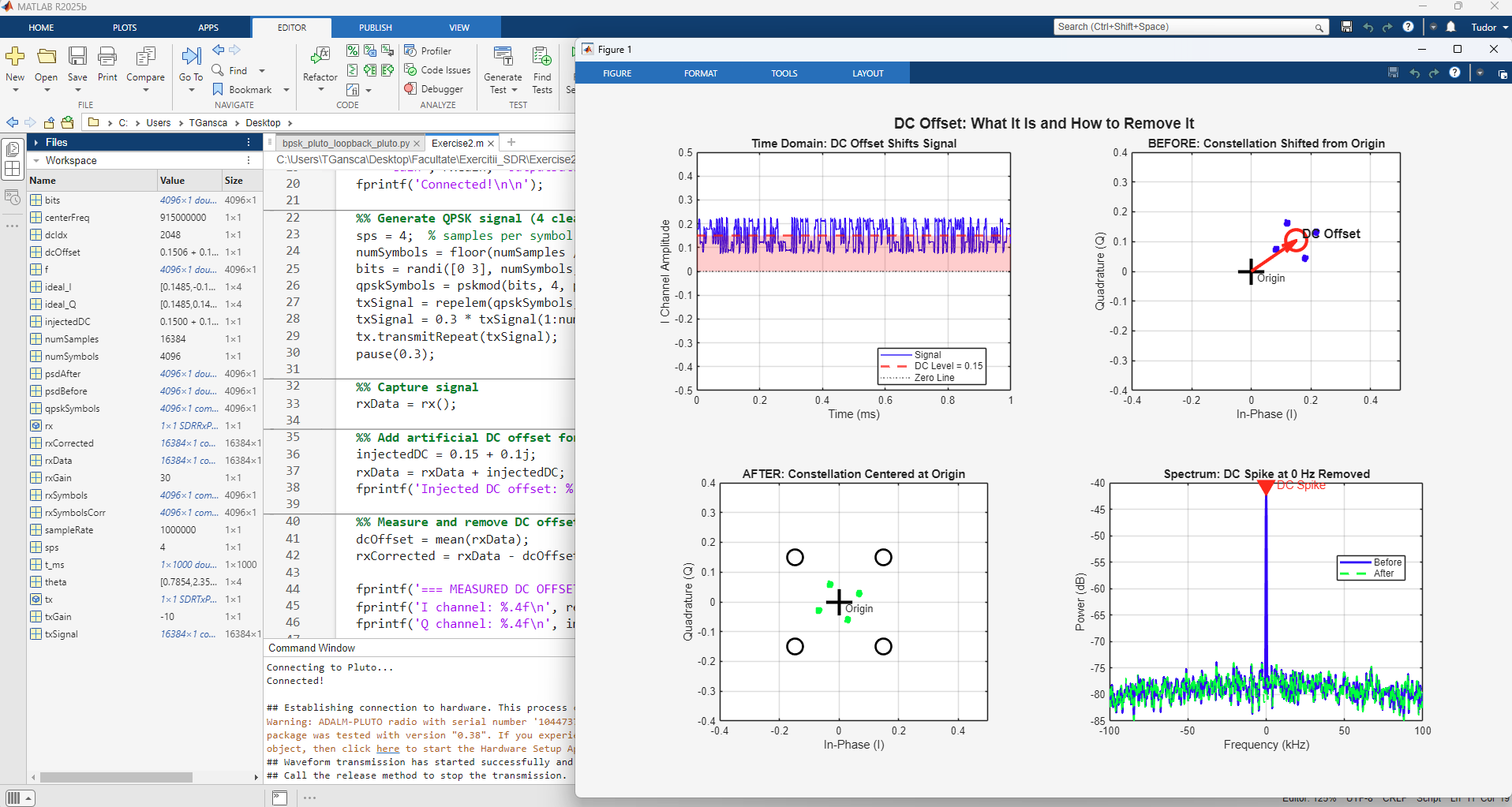
Figure 13 MATLAB Transceiver Toolbox streaming data from PlutoSDR
The MATLAB toolboxes are ideal for engineers already working in the MathWorks ecosystem who need to integrate real hardware into their simulation and algorithm development workflows.
SDR Solutions Provided by ADI
These are a few of our SDR products for hobbyists and professionals alike. The hands-on exercises section below showcases their capabilities along with several application examples that guide you from both a theoretical and practical point of view.
Hardware Platforms:
The following three ADI SDR platforms offer different capabilities to suit various development needs:
- ADALM-PLUTO:
Entry-level SDR ideal for learning and prototyping
2x Tx and 2x Rx ports (50 Ohm matched)
LO Frequency Range: 70MHz → 6GHz
Bandwidth: 56MHz
Sample rate: 61.44MSPS; 14 bits
Interfaces: USB2, UART
- Jupiter (AD-JUPITER-EBZ):
Mid-range platform for advanced development
2x Tx and 2x Rx ports (50 Ohm matched)
LO Frequency Range: 30MHz → 6GHz
Bandwidth: 40MHz
Sample rate: 61.44MSPS; 16 bits
Interfaces: USB3, 1Gb Ethernet, Display Port, UART
- Talise SOM (ADRV9009-ZU11EG):
High-performance platform for production-grade applications
4x Tx and 4x Rx (expandable to 8 TRx)
LO Frequency Range: 75MHz → 6GHz
RX Bandwidth: 200MHz, TX Bandwidth: 450MHz
Interfaces: USB3, 1Gb Ethernet, Display Port, PCIe 3.0, SFP, QSFP, UART
All three platforms share the same software stack and HDL architecture, demonstrating ADI’s platform scalability—algorithms developed on the entry-level Pluto can be seamlessly transferred to production-grade hardware with minimal code changes.
Hands on exercises
References
ADI Hardware:
Books and Learning Resources:
SDR Software Platforms:
Academic References:
[10] K. Mueller and M. Muller, “Timing recovery in digital synchronous data receivers,” IEEE Trans. Commun., vol. C-24, no. 5, pp. 516-531, May 1976.
[11] J. Costas, “Synchronous Communications,” Proceedings of the IEEE, vol. 44, p. 1713-1718, 1956
ADI Kuiper Linux: