Introduction to the ADALM-PLUTO
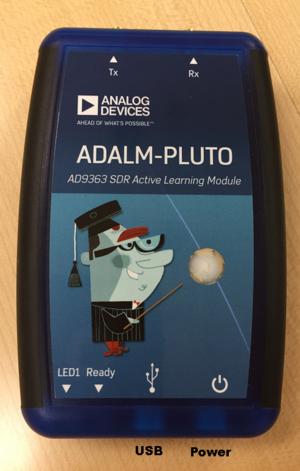
To use the ADALM-PLUTO Active Learning Module, you have:
RF Connectors
2 RF SMA connectors [1] to connect to instrumentation or antennas
Transmit (labeled ‘Tx’)
Receive (labeled ‘Rx’)
300 MHz - 3.8 GHz
200 kHz - 20 MHz channel bandwidth
USB Connectivity
USB for your host connectivity (used to stream data)
USB 2 (480 Mbits/second)
libiio USB device for communicating to the RF device
Network device
Remote Network Driver Interface Specification (RNDIS)
This will enumerate with the
192.168.2.1IP address by default.
USB serial device
“provides access to the Linux console on the Pluto device via USB Communication Device Class Abstract Control Model” (USB CDC ACM)
Mass storage device
this will appear to the host as a disk, where you can find links for software uploads, and the serial number of the device.
External Power
External power
During Pluto design, potential consumption exceeded 5 unit loads for USB 2 (500mA), so a backup power connector was added. Not necessary for nominal use.
An external adapter (like this one from Adafruit)
“We know the ‘Power’ icon is the ‘on/off’ icon, if you think that is confusing - please let us know.”